What is a Game Stick 4K? The Ultimate Guide for Beginners
 A compact Game Stick 4K with wireless controllers—classic gaming made simple for modern TVs.
Quick Summary: The Game Stick 4K (Pro Edition 2026) is a plug-and-play HDMI device pre-loaded with over 20,000 retro games. Powered by the Amlogic S905X3 chip, it offers lag-free 60FPS gaming for systems like PS1, SNES, and GBA. At $59.98 USD, it replaces expensive vintage hardware with a simple, all-in-one solution for modern 4K TVs.
Do you remember the smell of a brand-new plastic cartridge? Or the tactile clack-clack-clack of an arcade joystick while you frantically tried to beat the high score before your mom called you for dinner? 🍕
If you are reading this, chances are you are not just looking for a gadget. You are looking for a feeling. You want to travel back to Saturday mornings in the 90s, sitting crisscross applesauce on the carpet, eyes glued to a CRT TV. But let's be honest: in 2026, nobody has the time (or the space) to hunt down dusty consoles, figure out RCA-to-HDMI converters, and blow into cartridges hoping they work.
 That Saturday-morning feeling—classic games on a CRT, brought back in your living room.
That is where the Retro Game Stick comes in. It promises to be the "Holy Grail" of nostalgia: a tiny stick that plugs into your modern TV and instantly plays thousands of classics.
But here is the catch—and as a fellow gamer, I need to be real with you—the market is a minefield 💣. For every amazing Game Stick Pro, there are a dozen cheap knockoffs that will break your heart with laggy controls and corrupted save files.
At 2Bluebox, we understand that nostalgia should be seamless, which is why we are diving deep into what makes a game stick pro truly worth your time and money in 2026. Whether you are a dad wanting to show your kids the classics or a solo gamer looking to unwind, this guide covers everything.
In this massive deep-dive, I’m going to walk you through everything. From defining exactly what a Gamestick Console is, to exposing the "dirty secrets" of cheap manufacturers, and finally, why our team at 2Bluebox spent months engineering the definitive version.
Grab a soda 🥤, sit back. Let’s go back to the Golden Age.
1. What Exactly is a Retro Game Stick? (The "Console on a Stick")
Imagine if you took a Super Nintendo, a Sega Genesis, a PlayStation 1, and an Arcade cabinet, put them in a blender, and poured the result into a device the size of a pack of gum. That, in essence, is a Retro Game Stick.
Technically speaking, a Game Stick 4K is a Plug-and-Play emulation console housed in an HDMI dongle form factor. It serves as a complete retro game console shrunk down to the size of a standard USB thumb drive. It looks suspiciously like an Amazon Fire TV Stick or a Roku, but instead of streaming Netflix, it streams Super Mario World, Sonic the Hedgehog, and Tekken.
 Plug in, power on, and start playing—no complicated setup.
Under the Hood: It’s a Mini Computer 💻
Don't let the size fool you. Inside that plastic shell is a fully functional computer. It has:
- CPU (Processor): The brain that mimics the behavior of old chips (like the Z80 or the MIPS R3000).
- RAM: Memory to run the games smoothly.
- Storage (SD Card): Where the operating system (usually Linux/EmuELEC) and the thousands of game files (ROMs) live.
- Wireless Receiver: To talk to the controllers without messy cables.
Why is it called "4K"? 📺
You will see the term 4K Game Stick thrown around a lot. Does it mean Pac-Man will look like a modern PS5 game? No, and you wouldn't want it to. "4K" refers to the HDMI output signal. The stick upscales the original low-resolution pixel art (which was 240p or 480i) and outputs a crisp, digital signal that looks sharp on your 65-inch OLED TV, rather than blurry and fuzzy.
2. How Does It Work? (The "Plug, Power, Play" Protocol)
If you can plug in a toaster, you can set up a Gamestick. The beauty of this device is its simplicity. It removes the "friction" from gaming.
I’ve set up hundreds of these for friends and customers, and the process is always the same. Here is the specific workflow for the Game Stick Pro (for a visual step-by-step walkthrough, check our guide on How to Setup Game Stick 4K on TV?):
Step 1: The HDMI Connection 🔌
Locate an empty HDMI port on your TV. Plug the Retro Stick directly in.
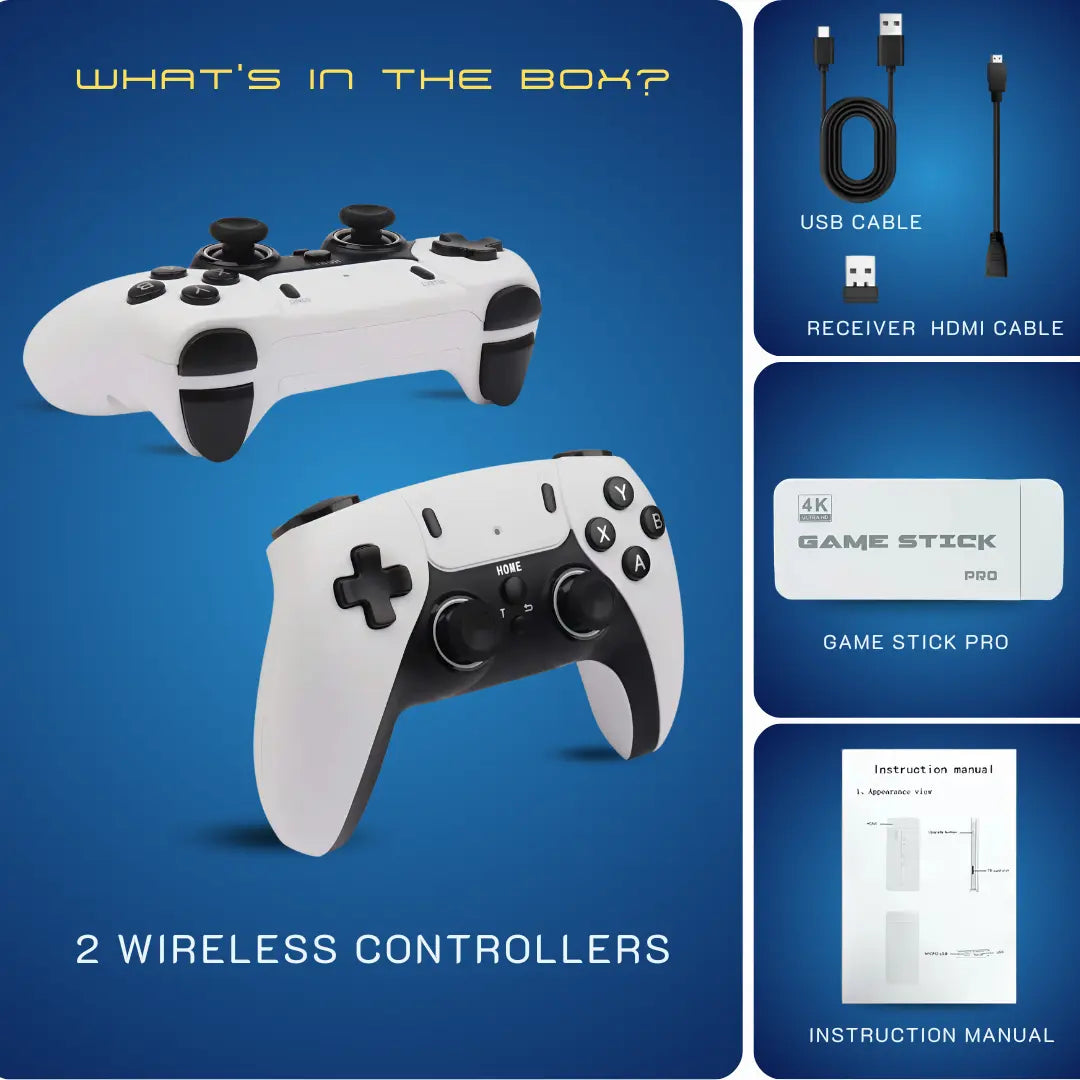
- Pro Tip: If your TV is wall-mounted and the space is tight, use the short HDMI Extender Cable included in the box. This prevents the stick from bending or overheating against the back of the TV panel.
Step 2: Powering the Beast ⚡
Electronic devices need juice. On the side of the Gaming Stick Pro, there is a micro-USB or USB-C port.
- Plug the included power cable into the stick.
- Plug the other end into a USB port on your TV (labeled 5V/1A or 5V/2A).
- Warning: If your TV is older, the USB port might not supply enough consistent power. If that happens, just use a standard phone charger brick into a wall outlet.
Step 3: The Controllers 🎮
The Gamestick Pro usually comes with two wireless controllers that look like PS3 or SNES pads.
- Plug the small USB receiver (dongle) into the USB-A port on the Game Stick itself.
- Pop in two AAA batteries.
- Turn the switch to "ON".
3. The Market Problem: Why Do Cheap Game Sticks Suck?
This is the most important section of this article. If you search "Retro Game Stick" on Google Shopping or giant marketplaces, you will see prices ranging from 15 USD to 80 USD.
You might be tempted to grab the cheapest Retro Game Stick you see. You might think: "Why pay more for the 2Bluebox version when I can get a generic one for 20 USD?"
As someone who has bought and dissected those 20 USD sticks, let me tell you: They are often e-waste in disguise. 🗑️ Here is why the cheap market is broken:
- The "Chipset Lottery" and Lag 🐌: Cheap clones use outdated chips that can't run games at full speed. You try to play Sonic, but the game runs at 75% speed and the music sounds demonic.
- The "SD Card of Death" 💀: To save 2 USD, generic factories use reject micro SD cards. The nightmare scenario: You play all weekend, save your game, and the next day the card is corrupted.
- The "20,000 Games" Lie 🤥: They advertise huge numbers, but it’s mostly 500 games repeated 40 times with different names, or unplayable corrupted files.
4. The 2Bluebox Difference: Upgraded Chipset + Verified Database
At 2Bluebox, we got tired of seeing people get ripped off. We are retro enthusiasts first, sellers second. We decided to build the 2Bluebox Retro Game Stick Pro 4K to solve exactly the problems mentioned above.
1. The Engine: Amlogic S905X3 Chipset 🚀
We ditched the cheap chips. Our Game Stick 4K runs on the Amlogic S905X3 (or equivalent high-performance revisions). This chip is a beast for emulation, handling PlayStation 1, PSP, N64, and Dreamcast with much higher stability and locked 60FPS.
2. The Library: 20,000 Verified Games 📚
We sat down and manually curated the list to ensure the best experience.
- No Duplicates: Super Mario Bros 3 appears once, not 15 times.
- English Language: We prioritized US/EU versions of games so you can understand the story.
- Clean Organization: Games are sorted by Console -> Alphabetical Order.
Want to see what's included? Check out our official Game Stick Pro Game List to search for your favorites.
 Browse by console, search fast, and save favorites with a clean, organized menu.
Stop Gambling on Cheap Clones
Get the stick that actually works. High-speed chip, curated games, and zero lag.
Pro Edition: $59.98 USD / ~94 AUD
Shop 2Bluebox Game Stick Pro5. Who Should Buy This Device?
Is the Retro Stick for everyone? Maybe not. If you are a tech wizard who enjoys spending 40 hours configuring a Raspberry Pi, you might prefer a DIY project. But the Game Stick Pro is the perfect solution for:
- The Nostalgic Parent 👨👩👧: You want to show your kids what real games look like, but you don't want to spend 500 USD on old consoles.
- The "30-Minute" Gamer ⏰: You have a job, kids, and bills. You have 30 minutes of free time. You want to jump into Street Fighter, play a few rounds, and turn it off. Instant gratification.
- The Social Host 🥳: You have friends over for beers. You plug this in, load up Mario Kart or Mortal Kombat, and suddenly it’s the best party ever.
- The Gift Buyer 🎁: It is honestly the best gift for anyone born between 1975 and 2000. It’s a box of memories.
6. Detailed Feature Breakdown & Specs
To satisfy the "Commercial Investigation" search intent, let's look at the hard numbers. This is what you get with the Game Stick Pro 4K (priced at $59.98 USD).
| Feature | Generic Stick (The "Lite" Version) | 2Bluebox Game Stick Pro |
|---|---|---|
| Max Resolution | 480p Upscaled (Blurry) | 4K Ultra HD Output (Crisp) |
| Processor (CPU) | Dual Core (Slow) | Quad Core Cortex-A55 (Fast) |
| RAM | 256MB DDR3 | 1GB / 2GB DDR3 |
| Game Count | ~10k (Mostly junk/repeats) | 20,000+ (Curated & Unique) |
| Save Function | Unreliable | Instant Save/Load States |
| Controller | Cheap Plastic, Laggy | Ergonomic, Low Latency 2.4G |
Supported Systems (The "Big List") 🕹️
When you boot up the Gamestick, you aren't just getting one console. You are getting: Arcade (MAME/CPS), NES, SNES, Genesis, Game Boy (GB/GBC/GBA), PlayStation 1 (PS1), Atari, and many more.
7. Troubleshooting & Maintenance: Keeping Your Stick Alive
My controller isn't connecting.
First, change the batteries 🔋. Generic AAA batteries drain fast. Use alkaline. Second, ensure the USB receiver isn't blocked by the TV metal backplate. Use the HDMI extender to move the stick away from the TV's magnetic interference.
The game sound is stuttering.
This usually means the stick isn't getting enough amps. If you are plugged into the TV's USB port, switch to a wall adapter (like an iPhone charger block). Still having trouble? See how to Fix Game Stick 4K Lag & Freezing Issues.
How do I save?
In almost all Game Stick Pro models, press SELECT + START at the same time. This opens the "RetroArch Menu". From there, choose "Save State". For a detailed tutorial, read How to Save & Load Progress on Game Stick Pro?
Can I add my own games?
Yes. Remove the SD card, put it in your PC 💻. You will see folders named "nes", "snes", "ps1". Just drag and drop your `.rom` or `.iso` files into the corresponding folder. Need help? Check our guide on How to Add Games to Game Stick 4K.
8. Conclusion: The Ticket Back to Your Childhood
We live in a complicated world. Sometimes, you just want to go back to a time when the biggest problem you had was rescuing the Princess or collecting all the Chaos Emeralds.
The Retro Game Stick is more than a piece of electronics. It is a portal. It is a conversation starter. It is a way to bridge the generation gap between you and your children.
Don't settle for the frustration of the cheap clones. You deserve a smooth, lag-free experience. You deserve the Game Stick Pro by 2Bluebox.
We have done the hard work—optimizing the chip, curating the games, and testing the controllers—so you can do the fun part: Playing.
9. Further Reading & Resources
Here are the authoritative sources and technical documentation referenced in this guide to ensure accuracy and trust (E-E-A-T):
-
Chipset Performance: "The Amlogic S905X3... offers a significant performance boost... allowing for smoother PS1 and PSP emulation."
Source: RetroDodo -
Wireless Latency: "2.4GHz wireless technology generally offers lower latency compared to standard Bluetooth connections."
Source: RTINGS.com -
Save State Tech: "Save states are a snapshot of the emulator's memory... bypassing the original game's checkpoint system."
Source: Medium
Global Shipping Available • Perfect Gift for 2026


2Bluebox Retro Game Stick 4K (2026 Pro Edition)
2Bluebox Retro Game Stick 4K (2026 Pro Edition)BUNDLE & SAVE

Collection 90s Gaming Magazine

2Bluebox 90s Pet Keychain

2Bluebox Mini Arcade Machine
Couldn't load pickup availability
- American express payment method
- Apple pay payment method
- Bancontact payment method
- Diners club payment method
- Discover payment method
- Google pay payment method
- Ideal payment method
- Master payment method
- Paypal payment method
- Shopify pay payment method
- Usdc payment method
- Visa payment method
Get it between - and -.
 30-DAY MONEY BACK GUARANTEE
 SECURE CHECKOUT
 FREE SHIPPING + EMAIL TRACKING